How to Find Your FPL Team ID
Step-by-step for the FPL website and for the FPL app on iPhone and Android
Your FPL Team ID is a unique number that identifies your Fantasy Premier League team. You'll need this to connect your account and import your squad data. Once it is connected, you can plan your transfers, captains and chips from your own squad in the team planner.
On the FPL website
Open Your Transfer History
Go to the Fantasy Premier League website and log in to your account. Open "Pick Team" and click "Transfer History" in the panel beside your squad. The "Points" tab works too.
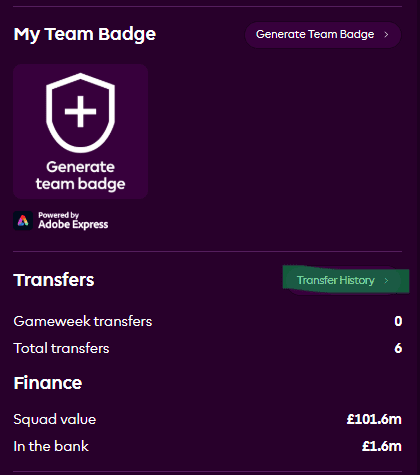
Click "Transfer History" to open a page that shows your ID
Find Your Team ID in the URL
Look at the URL in your browser's address bar. Your team ID is the number that appears after /entry/ in the URL.

Your Team ID is the number in the URL
Example URL:
fantasy.premierleague.com/In this example, 123456 is your Team ID. Some addresses start with /en/entry/; the number after /entry/ is still your ID.
On the FPL app (iPhone and Android)
The official FPL app does not show your Team ID on any screen, and it has no address bar to read it from. On your phone, open the FPL website in your browser instead. It uses the same account as the app, so your team is already there.
Open the FPL Website in Your Phone's Browser
On iPhone, open Safari. On Android, open Chrome. Go to fantasy.premierleague.com and log in with the email and password you use in the app.
Tap Points
Tap "Points" in the menu to open your team's points page. This is the page whose address includes your Team ID.
Tap the Address Bar and Read the Number
Phone browsers often show only the site name, so tap the address bar once to see the full address. Your Team ID is the number after /entry/.
Example address:
fantasy.premierleague.com/In this example, 123456 is your Team ID
Quick Tips
- Your Team ID is usually a 6 to 8 digit number
- Any FPL page whose address contains
/entry/shows it, such as Points or Transfer History - You get a new Team ID each season, so find it again after you pick your squad for a new season
- Your Team ID is not a password: it lets tools read your team, not change it
Still having trouble finding your Team ID? Make sure you're logged in to the FPL website, not the app, and looking at your Points or Transfer History page, not the homepage.